
Transactions on Cryptographic Hardware and Embedded Systems 2026
Breaking the Myth of MPCitH Inefficiency:
Optimizing MQOM for Embedded Platforms
README
Experiments with embedded MQOM
The current repository contains experimental code for the MQOM NIST PQ round 2 on-ramp signature candidate. This code is a companion to the article "Breaking the Myth of MPCitH Inefficiency: Optimizing MQOM for Embedded Platforms" (the extended version can be found here) that details all the optimization strategies included here. The code provided here contains patches of the upstream MQOM code in its version 2.1 (the last specification update at the time of writing the article).
The source code is mostly split in four parts:
- A main firmware source code in the embedded_CM4 folder. This code is based on libopencm3 to provide
a minimalist standalone firmware for Cortex-M4 based platforms (see below for the detail of the supported boards). The outstanding code in this firmware
concerns the benchmarking part, with cycles measurement, stack usage measurement using spraying techniques, and static data (e.g. global tables) measurement
using dedicated ELF sections and
ldscripts tricks. - Source code for the original MQOM optimizations in the mqom_base folder.
- Source code for the one-tree tweak of MQOM in the mqom_onetree folder.
- Source code for the streaming verification and pre-signature tweaks in the mqom_verifstream_presign folder.
The main compilation of the various testing firmwares is performed using a centralized Makefile at the root folder of the project. We explain hereafter the various command lines to use for each test to reproduce the results of the article.
Table of Content
- Target platforms and required software
- Quick Reproduction Guide
- Rijndael tests
- Matrix Multiplication tests
- MQOM base optimizations
- MQOM one-tree experiments
- MQOM verification streaming experiments
- MQOM pre-signature experiments
Target platforms and required software
Target platforms
There are two main platforms targeted here for the article:
- The STMicroeletronics Nucleo L4R5ZI featuring a STM32L4R5ZI MCU with 2 MB of flash and 640 KB of SRAM.
- A custom board that integrates a STM32F437 MCU with 2 MB of flash and 256 KB of SRAM, also embedding a CRYP engine with AES hardware acceleration. The current implementation uses a LEIA board by H2LAB.
We also support the STMicroeletronics STM32F4DISCOVERY board that features a STM32F407 MCU with 1 MB of flash and 192 KB of SRAM. Regarding the custom LEIA board with the AES accelerator, if you have a different board with a STM32F437 check the Porting to other Cortex-M boards paragraph for insights on how to adapt the code.
Easy setup with Docker
We provide in the Docker folder a Dockerfile that embeds the ARM toolchain used for the benchmarks. You must obviously have docker installed to use it.
The purpose of this file is to drop a "dev shell" with all the tool installed so that you can execute compilation (and flashing depending on the host, see below).
The Makefile has two dedicated targets: make dev-shell and make dev-shell-usb.
When running make dev-shell, you should be greeted with a shell like this:
devuser@ccf10d67c871:/home/app#
where you can run the commands presented in the current repository.
With make dev-shell-usb, docker will share the USB connection with the development board(s) connected to USB: beware that this launches Docker in a privileged mode to share USB, use it at your own
risks. This allows to flash the boards directly from within the container. Beware that this is only compatible with Linux hosts because of the way USB sharing is handled.
make dev-shell-usb
Checking host OS compatibility wit USB sharing...
WARNING: to share USB, docker will run with '--privileged', use at your own risks.
Do you still want to continue? [y/N] y
Building Docker image...
[+] Building 0.4s (10/10) FINISHED                                                                                                                                                                                                             docker:default
...
Launching dev environment with USB support
devuser@67d37673fd15:/home/app#
NOTE: The container drops you a shell with the uid/gid of your user to keep the proper rights on your files. However, depending on your host rights with /dev/bus/usb, you might need
to perform the flashing as root. If you encounter a "permission denied" when trying to flash, launch the command again with sudo in the container.
Compiling
The source code can be compiled for either of the three boards using compilation toggles: BOARD=nucleol4r5zi for the Nucleo L4R5ZI board, BOARD=leia for the custom STM32F437 board,
BOARD=stm32discovery for the STM32F4DISCOVERY board. By default, the Makefile will compile for the Nucleo L4R5ZI board when no BOARD is specified.
The result of the compilation are two files in the embedded_CM4/ folder: a main.elf ELF file and a main.bin file that represents the flat raw binary firmware that is flashed through ST-Link.
You can use the ELF file for loading the debugging symbols during your gdb sessions if needed.
All the results and benchmarks in the article have been obtained with the arm-none-eabi-gcc toolchain from Debian Trixie in version 14.2.1:
$ arm-none-eabi-gcc -v
Using built-in specs.
COLLECT_GCC=arm-none-eabi-gcc
COLLECT_LTO_WRAPPER=/usr/lib/gcc/arm-none-eabi/14.2.1/lto-wrapper
Target: arm-none-eabi
...
Thread model: single
Supported LTO compression algorithms: zlib
gcc version 14.2.1 20241119 (15:14.2.rel1-1)
Flashing
In order to flash the firmware, you will have to use the st-flash tool that should be packaged in most Linux distros (e.g. stlink-tools package in
Debian). When the tool is installed, choose your board and execute the flashing command (here xxx is the chosen board):
BOARD=xxx make flash
A flasher with a ST-Link chip that programs the board is of course expected to be plugged in on your PC USB port to perform this (many boards such as the Nucleo L4R5ZI or the STM32F4DISCOVERY also contain such chips and can be transformed into flashers for other boards, for the LEIA board you will have to use such an external programmer or adapt the flashing method to use the specific DFU mode).
UART console communication
When the firmware is flashed, communication is done using the UART protocol with a 38400 baud rate:
- For the Nucleo L4R5ZI, the embedded serial port is used, usually showing up as
/dev/ttyACMx(withxa number) in Linux hosts. - For the custom LEIA board, the UART used is
USART1on the GPIOsPB6andPB7(see embedded_CM4/src/hal/hal.h). You will have to plug a dedicated TTY serial converter to those pins and to your PC to get the serial console. - For the STM32F4DISCOVERY board, the UART used is
USART2on the GPIOsPA2andPA3(see embedded_CM4/src/hal/hal.h). You will have to plug a dedicated TTY serial converter to those pins and to your PC to get the serial console.
About portability of the code across platforms
As described in the article, most of the code is in portable C, except for two parts that use assembly for the ARMVv7-M architecture:
- SHA-3/SHAKE: the assembly files are in sha3/armv7m/.
- AES-128 (for MQOM security level L1): the assembly files are rijndael/aes128_fixsliced_arvmv7m.s for the "fixsliced" (bitslice) constant-time version, and rijndael/aes128_table_arvmv7m.s for the table-based version (constant time only when tables are in SRAM, and SRAM access is constant time on the target platform).
However, one can always switch to pure C variants for the previous components. In order to do so:
- Force the SHA-3 library to use C with the explicit compilation toggles
KECCAK_PLATFORM=plain32orKECCAK_PLATFORM=opt64(plain32is a 32 bits variant, whileopt64usesuint64_t: depending on your target architecture, one can be more performant than the other). - Remove the
RIJNDAEL_OPT_ARMV7M=1(or set it to0) in all the following compilation command lines to backup to the C variant of AES-128.
Hence, with the KECCAK_PLATFORM=plain32 RIJNDAEL_OPT_ARMV7M=0 or KECCAK_PLATFORM=opt64 RIJNDAEL_OPT_ARMV7M=0 compilation toggles, you should end up with a pure C portable code that should
execute on any (embedded or not) platform (ARM, RISC-V, x86, etc.). Of course, you will have to adapt the compiler and the linking part yourself so that the toolchain produces a binary/firmware suitable
for your platform/MCU/board. You can override the toolchain parameters by overloading CROSS_CC, CROSS_AR abd CROSS_RANLIB as well as the CFLAGS and LDFLAGS for the MQOM objects compilation.
The elements in the embedded_CM4/ are of course more "rigid" as they are closely related to Cortex-M and the libopencm3 stuff (see Porting to other Cortex-M boards).
As a matter of fact, this portability allows for testing the soundness of the various generic optimizations of MQOM on x86 or ARM desktops. For instance, if you want to locally test
the LUT profile, you can extract the MQOM2_OPTIONS and compile the MQOM bench binary in the mqom_base/ folder (observe the bench target instead of the firmware target as we
use the original MQOM compilation toolchain, and here the local gcc is used):
# Local compilation in the mqom_base folder
cd mqom_base && make clean && MQOM2_VARIANT=cat1-gf16-faster-r5 USE_PRG_CACHE=1 USE_PIOP_CACHE=0 MEMORY_EFFICIENT_PIOP=0 PIOP_BITSLICE=1 FIELDS_BITSLICE_COMPOSITE=1 FIELDS_BITSLICE_PUBLIC_JUMP=1 MEMORY_EFFICIENT_BLC=1 MEMORY_EFFICIENT_KEYGEN=1 RIJNDAEL_OPT_ARMV7M=0 KECCAK_PLATFORM=plain32  USE_GF256_TABLE_LOG_EXP=1 RIJNDAEL_BITSLICE=0 RIJNDAEL_TABLE=1 RIJNDAEL_EXTERNAL=0 USE_ENC_CTX_CLEANSING=0 USE_ENC_X8=0 USE_XOF_X4=0 BLC_INTERNAL_X2=1 GGMTREE_NB_ENC_CTX_IN_MEMORY=3 BENCHMARK=0 VERIFY_MEMOPT=0 NO_EXPANDMQ_PRG_CACHE=1 PRG_ONE_RIJNDAEL_CTX=0 SEED_COMMIT_MEMOPT=0 RIJNDAEL_TABLE_FORCE_IN_FLASH=0 USE_SIGNATURE_BUFFER_AS_TEMP=0 make bench

# In the mqom_base folder, execute the bench
./bench
Porting to other Cortex-M boards
Since we use libopencm3 as the foundation of our firmware code, and since our MQOM code is in portable C (note that our assembly is compatible with Cortex-M3/M4/M7, but not with Cortex-M0 where the C variant of the code must be used), one should be able to port the firmware to any board with a MCU supported by this library. The list of these target MCUs is reported in the README in the folder dedicated to the library.
When considering porting to a new MCU/board combo, the main files to modify are in the Hardware Abstraction Layer folder embedded_CM4/src/hal/ as well as the linker scripts in embedded_CM4/boards/.
You will have to adapt depending on the MCU various initialization procedures such as the clock_setup that initializes the clocks, the UART setup and wiring to the proper GPIO pins of your board, etc.
Using upstream MQOM repo
The current repository uses fixed MQOM code in the mqom_base, mqom_onetree and mqom_verifstream_presign folders.
It is possible to use the upstream MQOM code by forcing the UPSTREAM=1 variable when compiling in place of one of
ONETREE_TEST=1, PRESIGN_TEST=1 and VERIFY_STREAM_TEST=1 (you can also tweak the Makefile to point to another repository). Using the upstream code will allow
you to test new upstream feature in the embedded context.
In order to use the upstream code, you will first have to fetch it by using :
$ make clean && BOARD=nucleol4r5zi UPSTREAM=1 make
...
[-] The MQOM git folder is not present ... Please fetch it with 'make fetch_mqom_git'!
make: *** [Makefile:107: objects] Error 1

$ make fetch_mqom_git
[+] Fetching MQOM2 source tree from the git ...
...

# Then use all the compilation invocations presented below with UPSTREAM=1
NOTE: Beware that using the upstream code might break the embedded compilation depending on the included features and your options for MQOM.
Use UPSTREAM=1 it knowingly.
Python script for reproduction
The script tools/reproduce_table.py automates the
full pipeline for each paper table or figure: firmware compilation, board
flashing, UART capture, output parsing, and result formatting. It requires
Python 3.8+ and the following packages:
Required:
pip install pyserial
Optional — only needed to generate the DMA vs Polling plot (auto-enabled with --board leia --table rijndael):
pip install matplotlib
See the Quick Reproduction Guide below for usage
examples, the full list of --table arguments, and instructions for running
inside Docker or natively.
Note: the script holds an exclusive lock on the serial port for the entire session. Close any other tool reading the same port (e.g.
minicom,screen,picocom, Arduino Serial Monitor) before running the script, otherwise the port will be unavailable and the script will fail to open it.
Quick Reproduction Guide
The Tables and Figures numbering for reproduction are from this extended paper.
For an exact reproduction, we strongly advise running the script using the provided Docker in a Linux environment.
For those using another OS (such as macOS or Windows), it is possible to use the script in two steps: using the --no-flash option
for compilation only by calling the script inside the Docker environment (or compile by hand inside this environment), and then use the script with
the --no-compile option in your native environment so that the already compiled firmware can be flashed (you will obviously have to install all the
script dependencies for flashing in your native environment).
Run from the repository root (install dependencies first — see Python script for reproduction above):
python3 tools/reproduce_table.py --table <TABLE> --port <UART_PORT>
Use --board leia if a LEIA board is connected (enables hardware-AES runs and,
for --table rijndael, automatically saves dma_polling.csv and
dma_polling.png). The default is --board nucleol4r5zi, which skips all
LEIA-only runs.
--table argument |
Paper Table / Figure | Board(s) needed |
|---|---|---|
rijndael |
Table 2 (AES-128 & Rijndael-256 bitslice/table/HW) + Figure 3 (DMA vs Polling, --board leia only) |
Nucleo L4R5ZI; + LEIA with --board leia |
matmul |
Table 4 (matrix multiplication strategies, all security levels) | Nucleo L4R5ZI |
mqom-l1 |
Table 5 — L1 security level (LUT / Balanced / Memory / Hardware profiles) | Nucleo L4R5ZI; + LEIA with --board leia (HW profile) |
mqom-l3l5 |
Table 6 — L3 and L5 security levels | Nucleo L4R5ZI |
onetree |
Table 7 in §"Using One-Tree Technique" | Nucleo L4R5ZI; + LEIA with --board leia |
streaming |
Table 8 in §"Streaming the signature" | Nucleo L4R5ZI |
presign |
Table 9 in §"Pre-signature" | Nucleo L4R5ZI |
detailed |
Detailed BLC/PIOP breakdown Figure 6 (§"Detailed benchmarks") | Nucleo L4R5ZI; + LEIA with --board leia |
List all tables with their descriptions:
python3 tools/reproduce_table.py --list-tables
Additional flags:
--port <UART_PORT>— serial port of the board. On Linux:/dev/ttyACM0(Nucleo) or/dev/ttyUSB0(LEIA). On macOS:/dev/cu.usbmodemXXXX(usels /dev/cu.*to find it).--board nucleol4r5zi|leia— select the connected board (default:nucleol4r5zi). With--board leia, hardware-AES runs are included; with--table rijndael, the DMA vs Polling data (dma_polling.csv/dma_polling.png) is saved automatically.--no-compile/--no-flash— skip compilation or flashing when the firmware is already on the board.--verbose— print each serial line as it arrives (default: spinner).--output markdown— save the formatted table to<table>-results.mdin addition to printing it.
Filtering runs — use --filter TAG (repeatable) to run only a subset.
Tags from the same axis (e.g. two profiles) are OR-ed; tags from different axes (e.g. a level and a profile) are AND-ed.
List available tags for a table, then apply them:
python3 tools/reproduce_table.py --table mqom-l1 --list-filters
# balanced  fast  faster  hardware  l1  lut  memory  short

python3 tools/reproduce_table.py --table mqom-l1 --port /dev/ttyACM0 \
    --filter lut --filter balanced   # LUT or Balanced, all instances
python3 tools/reproduce_table.py --table mqom-l1 --port /dev/ttyACM0 \
    --filter lut --filter faster     # LUT Faster only (AND across axes)
The script compiles each firmware configuration in sequence, flashes it, sends
'g' on the serial port to start the benchmark, reads lines until END SERIAL COMM, parses the output, and prints the final formatted table.
Example — reproduce the MQOM L1 benchmarks on a Nucleo L4R5ZI:
python3 tools/reproduce_table.py --table mqom-l1 --port /dev/ttyACM0
Example — reproduce the full Rijndael table including HW AES + DMA/Polling plot (requires LEIA board):
python3 tools/reproduce_table.py --table rijndael --port /dev/ttyUSB0 --board leia
# → dma_polling.csv  (and dma_polling.png if matplotlib is installed)
Running inside Docker
The Docker environment provides the exact ARM toolchain used for the article.
make dev-shell is for compilation only (no USB sharing).
make dev-shell-usb adds USB sharing for flashing — Linux hosts only.
# Compilation + flashing (Linux host with board on USB) — recommended:
make dev-shell-usb
# Inside the container:
python3 tools/reproduce_table.py --table mqom-l1 --port /dev/ttyACM0
make dev-shell (without USB sharing) only provides a compilation environment —
the serial port is not accessible inside the container, so reproduce_table.py
cannot flash or capture UART output. Use it to pre-compile firmwares and then
flash/run natively, or use make dev-shell-usb for the full workflow.
Note:
make dev-shell-usbrequires a Linux host and will fail on macOS or WSL. On macOS, usemake dev-shellfor compilation only, then flash and capture natively withbrew install stlinkand runreproduce_table.pyoutside the container.
Disk space: building the Docker image requires approximately 3–4 GB of free disk space.
Running natively (outside Docker)
The benchmarks were produced with arm-none-eabi-gcc 14.2.1 from
Debian Trixie. Any significant deviation in toolchain version may yield
different numbers. Install on Debian/Ubuntu:
apt-get install gcc-arm-none-eabi
Note: compiling
common_tests/platform.cnatively (without the ARM cross-compiler targeting bare-metal newlib) will fail due to astruct timevalredefinition. This file is bare-metal firmware code and is not intended for native compilation. Use the Docker environment or the ARM cross-compiler.
Rijndael tests
Automated reproduction (Table 1 + Figure 3):
python3 tools/reproduce_table.py --table rijndael --port /dev/ttyACM0
# With LEIA board (adds HW-AES column and DMA/Polling figure):
python3 tools/reproduce_table.py --table rijndael --port /dev/ttyUSB0 --board leia
In order to reproduce the three main columns of Table 1 from the article that summarizes the AES-128 and Rijndael-256-256 performance for bitslice/table-based/hardware Rijndael, use the following compilation toggles:
- For the bitslice version:
make clean && BOARD=nucleol4r5zi RIJNDAEL_OPT_ARMV7M=1 RIJNDAEL_BITSLICE=1 RIJNDAEL_TEST=1 make firmware
- For the table-based version:
make clean && BOARD=nucleol4r5zi RIJNDAEL_OPT_ARMV7M=1 RIJNDAEL_TEST=1 RIJNDAEL_TABLE=1 make firmware
- For the hardware-based version, only on the custom STM32F437 based board (note the
-DNO_AES256_TESTS -DNO_RIJNDAEL256_TESTSextra CFLAGS since we only want to test AES-128 in this case):
make clean && BOARD=leia RIJNDAEL_OPT_ARMV7M=1 RIJNDAEL_TEST=1 RIJNDAEL_EXTERNAL=1 EXTRA_CFLAGS="-DNO_AES256_TESTS -DNO_RIJNDAEL256_TESTS" make firmware
NOTE: The private/public encryption APIs and the x2, x4, x8 APIs described in the article are exposed in the rijndael/rijndael.h header.
AES and Rijndael performance summary
The resulting benchmarks should be the following:
| Scheme | Variant | Bitslice KeySch. | Bitslice Enc. | Table-based KeySch. | Table-based Enc. | Hardware KeySch. + Enc. |
|---|---|---|---|---|---|---|
| AES-128 | x1 |
443 | 5 183 | 443 | 866 | 529 |
| AES-128 | x2 |
886 | 5 231 | 886 | 1 617 | 909 |
| AES-128 | x2 amortized |
2 896 | 3 071 | - | - | - |
| AES-128 | x4 |
1 772 | 10 372 | 1 772 | 3 082 | 1 661 |
| AES-128 | x4 amortized |
5 674 | 6 039 | - | - | - |
| Rijndael-256-256 | x1 |
1 452 | 22 790 | 1 435 | 4 122 | N/A |
| Rijndael-256-256 | x2 |
2 904 | 25 136 | 2 870 | 8 130 | N/A |
| Rijndael-256-256 | x2 amortized |
10 628 | 16 984 | - | - | N/A |
| Rijndael-256-256 | x4 |
5 808 | 50 502 | 5 740 | 16 113 | N/A |
| Rijndael-256-256 | x4 amortized |
21 135 | 33 861 | - | - | N/A |
NOTE: the figures provided in the above table slightly differ from the ones in the paper because the code for Rijndael has been updated a bit since the benchmarking campaign.
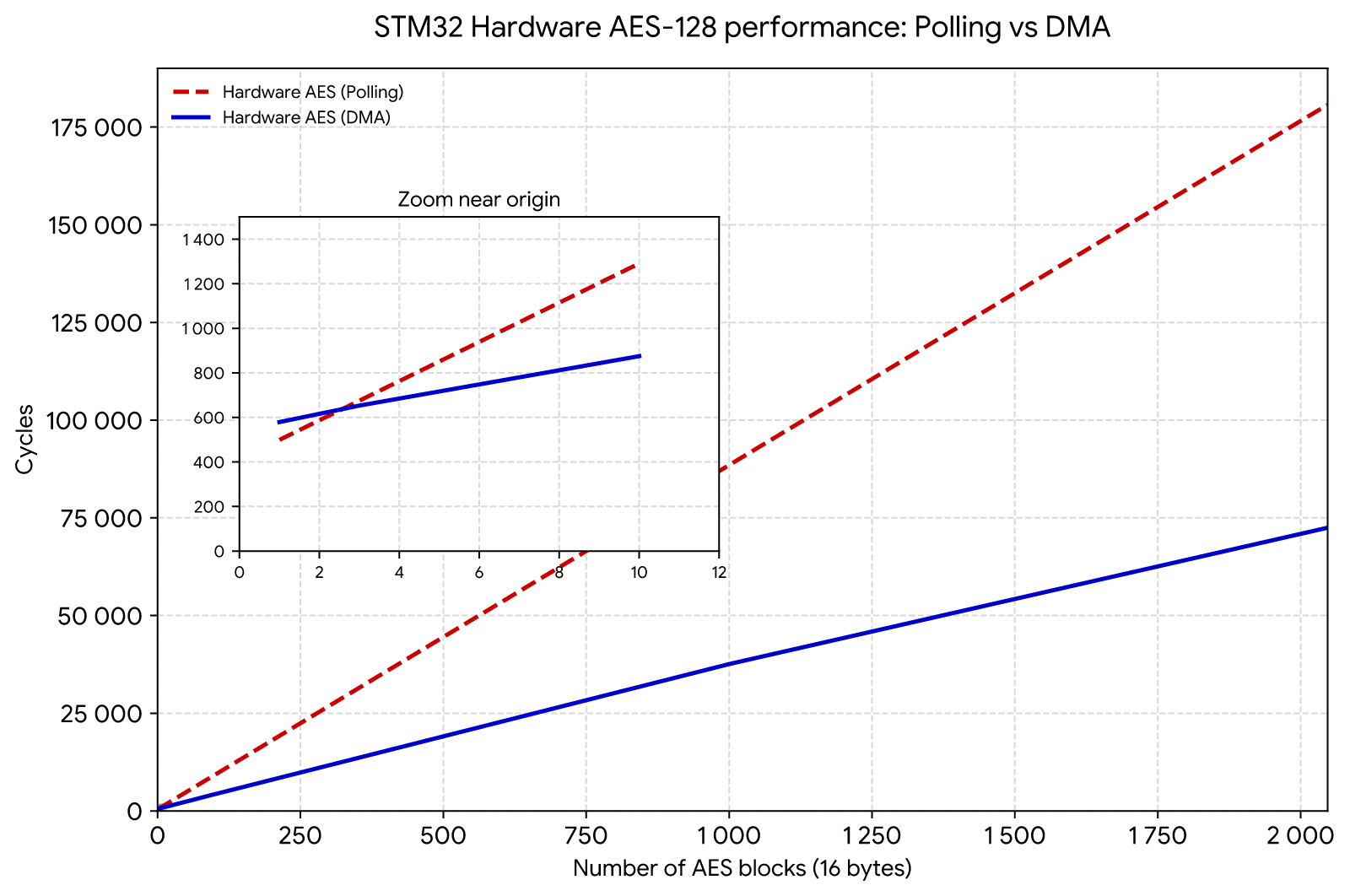
Hardware acceleration Polling versus DMA
The compilation of the hardware-based versions should also output a set of measurements to compare AES-128 hardware Polling versus DMA drivers.
For each type (Polling and DMA), each number at position i (between 1 and 2047) is the cycles taken by the encryption of i sequential blocks of 16 bytes.
 ==== Hardware AES polling versus DMA benchmarks =====
==== POLLING
499 587 675 763 851 939 1027 1115 1203 1291 1379 ... 180704
==== DMA
579 616 653 690 727 764 800 801 838 942 912 949 ... 72469
======================
Plotting these number provides Figure 3 of the article:
Matrix Multiplication tests
Automated reproduction (Table 3):
python3 tools/reproduce_table.py --table matmul --port /dev/ttyACM0
In order to reproduce the Table 3 from the article, summarizing the matrix multiplication performance for various strategies, use the following compilation toggles
(NOTE: we use MQOM2_OPTIONS="MQOM2_VARIANT=cat1-gf16-fast-r5" for the L1 security level, use MQOM2_OPTIONS="MQOM2_VARIANT=cat3-gf16-fast-r5" for the L3 level, and
MQOM2_OPTIONS="MQOM2_VARIANT=cat5-gf16-fast-r5" for the L5 level):
- For the F256 SWAR 32 bits L1 matrix multiplication against the 4 bitslice variants, use the following:
make clean && BOARD=nucleol4r5zi MQOM2_OPTIONS="MQOM2_VARIANT=cat1-gf16-fast-r5" BENCHMARK=1 MAT_MULT_TEST=1 make firmware
- For the F256 log/exp table L1 matrix multiplication against the 4 bitslice variants, use the following:
make clean && BOARD=nucleol4r5zi MQOM2_OPTIONS="MQOM2_VARIANT=cat1-gf16-fast-r5" USE_GF256_TABLE_LOG_EXP=1 BENCHMARK=1 MAT_MULT_TEST=1 make firmware
- For the F256 full 65 KB table L1 matrix multiplication against the 4 bitslice variants, use the following:
make clean && BOARD=nucleol4r5zi MQOM2_OPTIONS="MQOM2_VARIANT=cat1-gf16-fast-r5" USE_GF256_TABLE_MULT=1 GF256_MULT_TABLE_SRAM=1 BENCHMARK=1 MAT_MULT_TEST=1 make firmware
- For the "basic circuit" base implementation against the 4 bitslice variants, use the following:
make clean && BOARD=nucleol4r5zi MQOM2_OPTIONS="MQOM2_VARIANT=cat1-gf16-fast-r5" NO_FIELDS_REF_SWAR_OPT=1 BENCHMARK=1 MAT_MULT_TEST=1 make firmware
The resulting benchmarks should be the following:
| Implementation | F16 Fast L1 (n=56 / m̂=28, τ=17) | F16 Fast L3 (n=84 / m̂=42, τ=27) | F16 Fast L5 (n=116 / m̂=58, τ=36) |
|---|---|---|---|
| F256 Log/Exp tables ★ | 15.3 | 80.3 | 290 |
| Full F256 mult table † | 10.7 | 51.3 | 189 |
| Basic circuit | 64.2 | 348 | 1213 |
| SWAR 32 bits | 21.3 | 104 | 356 |
| Bitslice | 20.0 (0.1) | 66.1 (0.3) | 338 (0.5) |
| Bitslice with jump | 11.9 (0.1) | 39.2 (0.3) | 199 (0.5) |
| Bitslice composite | 15.8 (0.1) | 52.2 (0.3) | 278 (0.5) |
| Bitslice composite with jump | 9.9 (0.1) | 32.3 (0.3) | 160 (0.5) |
★ Log/Exp tables use ≈ 512 bytes in SRAM
† Full F256 multiplication table uses ≈ 65 KB in SRAM
MQOM base optimizations
Automated reproduction (Table 4):
# L1 security level (all profiles):
python3 tools/reproduce_table.py --table mqom-l1 --port /dev/ttyACM0
# L1 with Hardware profile (requires LEIA board):
python3 tools/reproduce_table.py --table mqom-l1 --port /dev/ttyUSB0 --board leia
# L3 and L5 security levels:
python3 tools/reproduce_table.py --table mqom-l3l5 --port /dev/ttyACM0
We provide hereafter the compilation configurations for the four profiles (LUT, Balanced, Memory and Hardware) of security level L1 in Table 4 of the article.
LUT profile
For the Faster instance, compile with:
make clean && BOARD=nucleol4r5zi MQOM2_OPTIONS="MQOM2_VARIANT=cat1-gf16-faster-r5 USE_PRG_CACHE=1 USE_PIOP_CACHE=0 MEMORY_EFFICIENT_PIOP=0 PIOP_BITSLICE=1 FIELDS_BITSLICE_COMPOSITE=1 FIELDS_BITSLICE_PUBLIC_JUMP=1 MEMORY_EFFICIENT_BLC=1 MEMORY_EFFICIENT_KEYGEN=1 RIJNDAEL_OPT_ARMV7M=1 USE_GF256_TABLE_LOG_EXP=1" RIJNDAEL_BITSLICE=0 RIJNDAEL_TABLE=1 RIJNDAEL_EXTERNAL=0 USE_ENC_CTX_CLEANSING=0 USE_ENC_X8=0 USE_XOF_X4=0 BLC_INTERNAL_X2=0 GGMTREE_NB_SIMULTANEOUS_LEAVES_LOG=5 BLC_NB_LEAF_SEEDS_IN_PARALLEL=32 BLC_SEEDCOMMIT_CACHE=1 BLC_SEEDEXPAND_CACHE=1 BENCHMARK=0 VERIFY_MEMOPT=0 NO_EXPANDMQ_PRG_CACHE=1 SEED_COMMIT_MEMOPT=0 SEED_COMMIT_MEMOPT=0 RIJNDAEL_TABLE_FORCE_IN_FLASH=0 USE_SIGNATURE_BUFFER_AS_TEMP=0 make firmware
For the Fast instance, replace MQOM2_VARIANT=cat1-gf16-faster-r5 with MQOM2_VARIANT=cat1-gf16-fast-r5. For the Short instance, replace MQOM2_VARIANT=cat1-gf16-faster-r5 with MQOM2_VARIANT=cat1-gf16-short-r5.
The results should be the following:
| Scheme | Instance | Sig. size | Implem | KGen (Mc) | Sign (Mc) | Verify (Mc) | KGen (KB) | Sign (KB) | Verify (KB) |
|---|---|---|---|---|---|---|---|---|---|
| MQOM (F16 R5) This work | Faster | 3 984 | LUT | 6.74★ | 29.2★ | 28.0 | 3.52★ | 12.0★ | 12.9 |
| MQOM (F16 R5) This work | Fast | 3 280 | LUT | 6.74★ | 52.8★ | 46.4 | 3.52★ | 10.5★ | 11.8 |
| MQOM (F16 R5) This work | Short | 2 916 | LUT | 5.99★ | 196★ | 194 | 3.65★ | 14.2★ | 17.7 |
★ Performance results rely on LUT use over secret entries.
Balanced profile
For the Faster instance, compile with:
make clean && BOARD=nucleol4r5zi MQOM2_OPTIONS="MQOM2_VARIANT=cat1-gf16-faster-r5 USE_PRG_CACHE=1 USE_PIOP_CACHE=0 MEMORY_EFFICIENT_PIOP=0 PIOP_BITSLICE=1 FIELDS_BITSLICE_COMPOSITE=1 FIELDS_BITSLICE_PUBLIC_JUMP=1 MEMORY_EFFICIENT_BLC=1 MEMORY_EFFICIENT_KEYGEN=1 RIJNDAEL_OPT_ARMV7M=1 USE_GF256_TABLE_LOG_EXP=0" RIJNDAEL_BITSLICE=1 RIJNDAEL_TABLE=0 RIJNDAEL_EXTERNAL=0 USE_ENC_CTX_CLEANSING=0 USE_ENC_X8=0 USE_XOF_X4=0 BLC_INTERNAL_X2=0 GGMTREE_NB_ENC_CTX_IN_MEMORY=0 NO_EXPANDMQ_PRG_CACHE=1 GGMTREE_NB_SIMULTANEOUS_LEAVES_LOG=5 BLC_NB_LEAF_SEEDS_IN_PARALLEL=32 BLC_SEEDCOMMIT_CACHE=1 BLC_SEEDEXPAND_CACHE=1 BENCHMARK=0 make firmware
For the Fast instance, replace MQOM2_VARIANT=cat1-gf16-faster-r5 with MQOM2_VARIANT=cat1-gf16-fast-r5. For the Short instance, replace MQOM2_VARIANT=cat1-gf16-faster-r5 with MQOM2_VARIANT=cat1-gf16-short-r5 and GGMTREE_NB_SIMULTANEOUS_LEAVES_LOG=5 BLC_NB_LEAF_SEEDS_IN_PARALLEL=32 with GGMTREE_NB_SIMULTANEOUS_LEAVES_LOG=7 BLC_NB_LEAF_SEEDS_IN_PARALLEL=64.
The results should be the following:
| Scheme | Instance | Sig. size | Implem | KGen (Mc) | Sign (Mc) | Verify (Mc) | KGen (KB) | Sign (KB) | Verify (KB) |
|---|---|---|---|---|---|---|---|---|---|
| MQOM (F16 R5) This work | Faster | 3 984 | Bal. | 9.95 | 37.3 | 28.5 | 2.50 | 10.9 | 12.0 |
| MQOM (F16 R5) This work | Fast | 3 280 | Bal. | 9.95 | 73.2 | 47.0 | 2.50 | 9.50 | 10.7 |
| MQOM (F16 R5) This work | Short | 2 916 | Bal. | 9.23 | 291 | 194 | 2.65 | 13.5 | 16.8 |
Memory profile
For the Faster instance, compile with:
make clean && BOARD=nucleol4r5zi MQOM2_OPTIONS="MQOM2_VARIANT=cat1-gf16-faster-r5 USE_PRG_CACHE=0 USE_PIOP_CACHE=0 MEMORY_EFFICIENT_PIOP=1 PIOP_BITSLICE=0 FIELDS_BITSLICE_COMPOSITE=1 FIELDS_BITSLICE_PUBLIC_JUMP=1 MEMORY_EFFICIENT_BLC=1 MEMORY_EFFICIENT_KEYGEN=1 RIJNDAEL_OPT_ARMV7M=1 USE_GF256_TABLE_LOG_EXP=0" RIJNDAEL_BITSLICE=1 RIJNDAEL_TABLE=0 RIJNDAEL_EXTERNAL=0 USE_ENC_CTX_CLEANSING=0 USE_ENC_X8=0 USE_XOF_X4=0 BLC_INTERNAL_X2=0 GGMTREE_NB_ENC_CTX_IN_MEMORY=0 BENCHMARK=0 VERIFY_MEMOPT=1 NO_EXPANDMQ_PRG_CACHE=1 PRG_ONE_RIJNDAEL_CTX=1 SEED_COMMIT_MEMOPT=1 PIOP_NB_PARALLEL_REPETITIONS_SIGN=9 PIOP_NB_PARALLEL_REPETITIONS_VERIFY=4 RIJNDAEL_TABLE_FORCE_IN_FLASH=1 GGMTREE_NB_SIMULTANEOUS_LEAVES_LOG=4 BLC_NB_LEAF_SEEDS_IN_PARALLEL=8 make firmware
For the Fast instance, replace MQOM2_VARIANT=cat1-gf16-faster-r5 with MQOM2_VARIANT=cat1-gf16-fast-r5. For the Short instance, replace MQOM2_VARIANT=cat1-gf16-faster-r5 with MQOM2_VARIANT=cat1-gf16-short-r5.
The results should be the following:
| Scheme | Instance | Sig. size | Implem | KGen (Mc) | Sign (Mc) | Verify (Mc) | KGen (KB) | Sign (KB) | Verify (KB) |
|---|---|---|---|---|---|---|---|---|---|
| MQOM (F16 R5) This work | Faster | 3 984 | Mem. | 9.93 | 79.6 | 68.4 | 1.48 | 6.56 | 3.91 |
| MQOM (F16 R5) This work | Fast | 3 280 | Mem. | 9.93 | 102 | 70.9 | 1.48 | 5.76 | 3.91 |
| MQOM (F16 R5) This work | Short | 2 916 | Mem. | 9.21 | 366 | 212 | 1.62 | 6.00 | 4.24 |
Hardware profile
NOTE: the Hardware profile is only available on the STM32F437 custom board with the AES hardware accelerator.
For the Faster instance, compile with:
make clean && BOARD=leia MQOM2_OPTIONS="MQOM2_VARIANT=cat1-gf16-faster-r5 USE_PRG_CACHE=1 USE_PIOP_CACHE=0 MEMORY_EFFICIENT_PIOP=0 PIOP_BITSLICE=1 FIELDS_BITSLICE_COMPOSITE=1 FIELDS_BITSLICE_PUBLIC_JUMP=1 MEMORY_EFFICIENT_BLC=1 MEMORY_EFFICIENT_KEYGEN=1 RIJNDAEL_OPT_ARMV7M=1 USE_GF256_TABLE_LOG_EXP=0" RIJNDAEL_BITSLICE=0 RIJNDAEL_TABLE=0 RIJNDAEL_EXTERNAL=1 USE_ENC_CTX_CLEANSING=1 USE_ENC_X8=0 USE_XOF_X4=0 BLC_INTERNAL_X2=0 GGMTREE_NB_ENC_CTX_IN_MEMORY=3 BENCHMARK=0 VERIFY_MEMOPT=0 NO_EXPANDMQ_PRG_CACHE=1 PRG_ONE_RIJNDAEL_CTX=0 SEED_COMMIT_MEMOPT=0 RIJNDAEL_TABLE_FORCE_IN_FLASH=1 GGMTREE_NB_SIMULTANEOUS_LEAVES_LOG=5 BLC_NB_LEAF_SEEDS_IN_PARALLEL=32 EXTRA_CFLAGS="-DEXTERNAL_COMMON_OVERRIDE -I../common_tests/" make firmware
For the Fast instance, replace MQOM2_VARIANT=cat1-gf16-faster-r5 with MQOM2_VARIANT=cat1-gf16-fast-r5. For the Short instance, replace MQOM2_VARIANT=cat1-gf16-faster-r5 with MQOM2_VARIANT=cat1-gf16-short-r5 and GGMTREE_NB_SIMULTANEOUS_LEAVES_LOG=5 BLC_NB_LEAF_SEEDS_IN_PARALLEL=32 with GGMTREE_NB_SIMULTANEOUS_LEAVES_LOG=7 BLC_NB_LEAF_SEEDS_IN_PARALLEL=64.
The results should be the following:
| Scheme | Instance | Sig. size | Implem | KGen (Mc) | Sign (Mc) | Verify (Mc) | KGen (KB) | Sign (KB) | Verify (KB) |
|---|---|---|---|---|---|---|---|---|---|
| MQOM (F16 R5) This work | Faster | 3 984 | Hard. | 8.96† | 23.5† | 22.6† | 1.28† | 9.96† | 10.9† |
| MQOM (F16 R5) This work | Fast | 3 280 | Hard. | 8.96† | 40.7† | 32.2† | 1.28† | 8.58† | 9.83† |
| MQOM (F16 R5) This work | Short | 2 916 | Hard. | 7.94† | 112† | 108† | 1.43† | 12.2† | 15.6† |
† Uses hardware acceleration for AES-128 (only on STM32F437).
L3 and L5 benchmarks
In order to benchmark the security levels L3 and L5, you simply have to replace the cat1 with respectively cat3 and cat5 in the MQOM2_VARIANT=cat1-gf16-faster-r5 option. These should fit in all the boards as L5 memory usage for all the profiles
is below 50 KB. Below are the expected results for the most resource intensive L5:
| Scheme | Instance | Sig. Size | Implem | KGen (Mc) | Sign (Mc) | Verify (Mc) | KGen (KB) | Sign (KB) | Verify (KB) |
|---|---|---|---|---|---|---|---|---|---|
| MQOM (F16 R5) This work | Faster | 15 864 | LUT | 95.8★ | 371★ | 364 | 7.70★ | 43.2★ | 46.7 |
| MQOM (F16 R5) This work | Faster | 15 864 | Bal. | 124 | 458 | 366 | 6.68 | 42.2 | 45.8 |
| MQOM (F16 R5) This work | Faster | 15 864 | Mem. | 125 | 1 347 | 1 497 | 2.33 | 18.9 | 7.99 |
| MQOM (F16 R5) This work | Fast | 13 772 | LUT | 95.8★ | 466★ | 454 | 7.71★ | 31.5★ | 32.3 |
| MQOM (F16 R5) This work | Fast | 13 772 | Bal. | 124 | 710 | 459 | 6.68 | 30.4 | 31.2 |
| MQOM (F16 R5) This work | Fast | 13 772 | Mem. | 125 | 1 336 | 1 243 | 2.33 | 15.8 | 7.75 |
| MQOM (F16 R5) This work | Short | 12 014 | LUT | 90.5★ | 1 660★ | 1 659 | 7.96★ | 36.0★ | 41.3 |
| MQOM (F16 R5) This work | Short | 12 014 | Bal. | 118 | 2 828 | 1 656 | 6.95 | 35.1 | 40.7 |
| MQOM (F16 R5) This work | Short | 12 014 | Mem. | 118 | 3 806 | 2 419 | 2.60 | 16.4 | 8.26 |
★ Performance results rely on LUT use over secret entries.
NOTE: for security levels L3 and L5 there is no hardware profile since they use Rijndael-256-256 and only AES-128 is available in the STM32 accelerator.
Reference MQOM implementation benchmarks
We provide in the article some benchmarks of the reference implementation of MQOM (i.e. the implementation without our memory optimizations, where the BLC trees and the MQ matrices are fully expanded in memory). These can be compiled, e.g. for Fast L1, with:
make clean && BOARD=nucleol4r5zi MQOM2_OPTIONS="MQOM2_VARIANT=cat1-gf16-faster-r5" make firmware
Adapt the MQOM2_VARIANT=cat1-gf16-faster-r5 with the instance you want, but beware that you will hit maximum SRAM usage for L1 Short, L3 and L5, yielding hangs or other spurious bugs during the execution.
The following results should be obtained:
| Scheme | Instance | Sig. size | Implem | KGen (Mc) | Sign (Mc) | Verify (Mc) | KGen (KB) | Sign (KB) | Verify (KB) |
|---|---|---|---|---|---|---|---|---|---|
| MQOM Ref. (F16 R5) | Fast | 3 280 | Ref. | 10.8 | 150 | 67.7 | 120 | 422 | 179 |
| MQOM Ref. (F16 R5) | Short | 2 916 | Ref. | 10.5 | –‡ | 255 | 142 | 1 700‡ | 599 |
‡ Reference implementation of MQOM where SRAM memory is not enough on the Nucleo L4R5ZI board.
Detailed benchmarks
Automated reproduction (detailed BLC/PIOP breakdown figure):
python3 tools/reproduce_table.py --table detailed --port /dev/ttyACM0
# With LEIA board (adds Hardware profile):
python3 tools/reproduce_table.py --table detailed --port /dev/ttyUSB0 --board leia
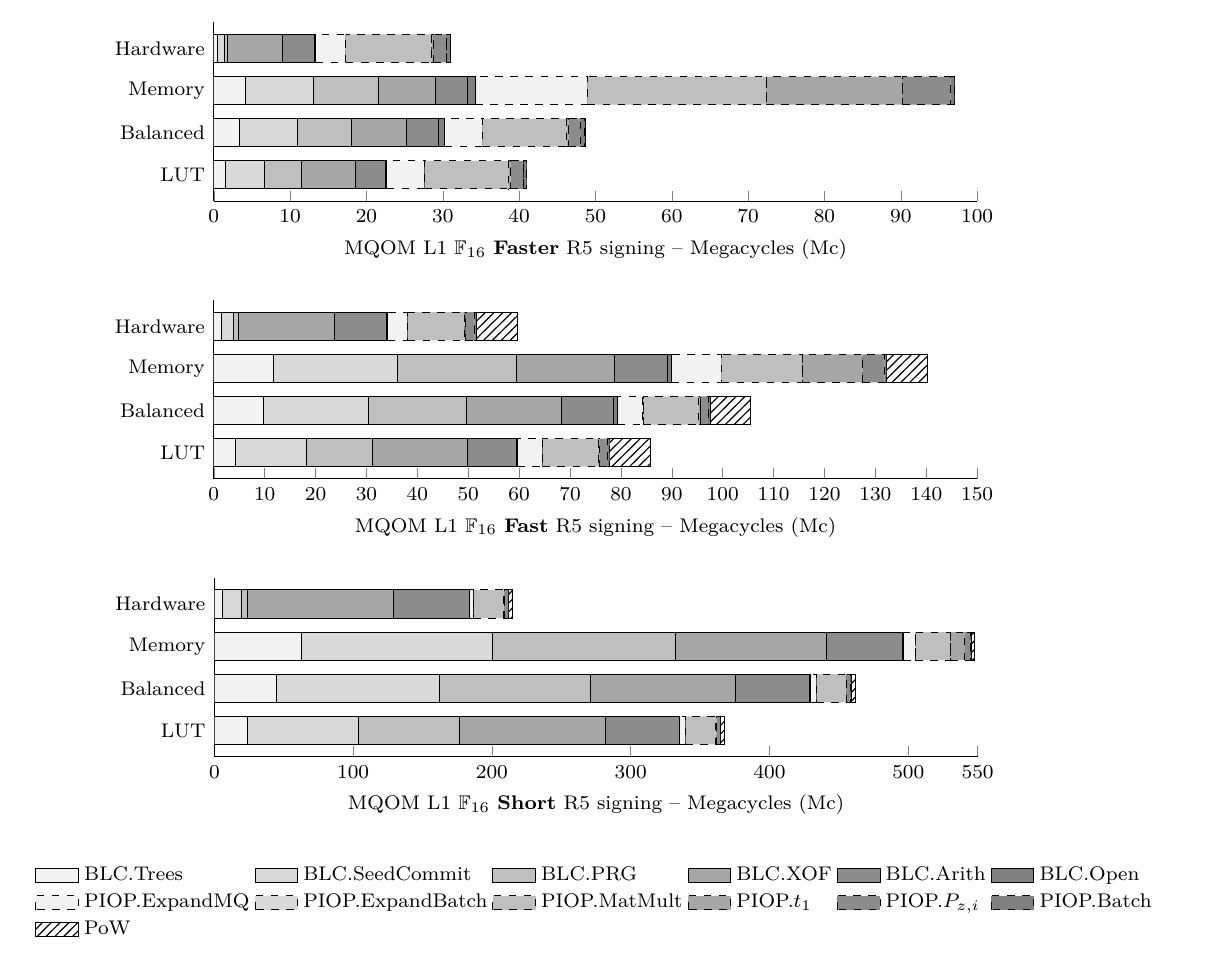
For all the previous compilation, you can get detailed benchmarks for BLC and PIOP components using the BENCHMARK=1 compilation toggle. For instance, for the L1 Balanced implementation Faster instance:
make clean && BOARD=nucleol4r5zi MQOM2_OPTIONS="MQOM2_VARIANT=cat1-gf16-faster-r5 USE_PRG_CACHE=1 USE_PIOP_CACHE=0 MEMORY_EFFICIENT_PIOP=0 PIOP_BITSLICE=1 FIELDS_BITSLICE_COMPOSITE=1 FIELDS_BITSLICE_PUBLIC_JUMP=1 MEMORY_EFFICIENT_BLC=1 MEMORY_EFFICIENT_KEYGEN=1 RIJNDAEL_OPT_ARMV7M=1 USE_GF256_TABLE_LOG_EXP=0" RIJNDAEL_BITSLICE=1 RIJNDAEL_TABLE=0 RIJNDAEL_EXTERNAL=0 USE_ENC_CTX_CLEANSING=0 USE_ENC_X8=0 USE_XOF_X4=0 BLC_INTERNAL_X2=0 GGMTREE_NB_ENC_CTX_IN_MEMORY=0 NO_EXPANDMQ_PRG_CACHE=1 GGMTREE_NB_SIMULTANEOUS_LEAVES_LOG=5 BLC_NB_LEAF_SEEDS_IN_PARALLEL=32 BLC_SEEDCOMMIT_CACHE=1 BLC_SEEDEXPAND_CACHE=1 BENCHMARK=1 make firmware
will provide the following additional output on the serial console:
...
Timing in cycles:
 - Key Gen: 9958488.00 cycles
 - Sign:    41112759.00 cycles
 - Verify:  30643322.00 cycles


 - Signing
   - BLC.Commit: 1310.000000 ms (20939882.000000 cycles)
   - [BLC.Commit] Expand Trees: 200.000000 ms (3364661.000000 cycles)
   - [BLC.Commit] Seed Commit: 460.000000 ms (7593437.000000 cycles)
   - [BLC.Commit] PRG: 430.000000 ms (7112036.000000 cycles)
   - [BLC.Commit] XOF: 450.000000 ms (7161957.000000 cycles)
   - [BLC.Commit] Arithm: 230.000000 ms (4205139.000000 cycles)
   - PIOP.Compute: 1200.000000 ms (19212700.000000 cycles)
   - [PIOP.Compute] ExpandMQ: 270.000000 ms (4934420.000000 cycles)
   - [PIOP.Compute] Expand Batching Mat: 0.000000 ms (34472.000000 cycles)
   - [PIOP.Compute] Matrix Mul Ext: 690.000000 ms (10984750.000000 cycles)
   - [PIOP.Compute] Compute t1: 20.000000 ms (226529.000000 cycles)
   - [PIOP.Compute] Compute P_zi: 90.000000 ms (1630160.000000 cycles)
   - [PIOP.Compute] Batch and Mask: 30.000000 ms (526702.000000 cycles)
   - Sample Challenge: 0.000000 ms (24479.000000 cycles)
   - BLC.Open: 50.000000 ms (835880.000000 cycles)
...
You should expect figures corresponding to something similar to the data in the following detailed charts (for the L1 security level):
Checking the KATs
In order to check that our optimizations respect the original MQOM specifications, it is possible to check the original KATs. Since the MCU is slow, we limit
the number of KATs to be checked. Activating the KAT is done through extra CFLAGS: EXTRA_CFLAGS="-DEMBEDDED_KAT_TESTS -DEMBEDDED_KAT_NUM_TESTS=2" where we ask
for 2 KATs to be checked here (you can put larger numbers, but beware of the slow processing ...). For instance, checking KATs for the Balanced profile optimizations
Fast L1 instance can be compiled with:
make clean && BOARD=nucleol4r5zi MQOM2_OPTIONS="MQOM2_VARIANT=cat1-gf16-fast-r5 USE_PRG_CACHE=1 USE_PIOP_CACHE=0 MEMORY_EFFICIENT_PIOP=0 PIOP_BITSLICE=1 FIELDS_BITSLICE_COMPOSITE=1 FIELDS_BITSLICE_PUBLIC_JUMP=1 MEMORY_EFFICIENT_BLC=1 MEMORY_EFFICIENT_KEYGEN=1 RIJNDAEL_OPT_ARMV7M=1 USE_GF256_TABLE_LOG_EXP=0" RIJNDAEL_BITSLICE=1 RIJNDAEL_TABLE=0 RIJNDAEL_EXTERNAL=0 USE_ENC_CTX_CLEANSING=0 USE_ENC_X8=0 USE_XOF_X4=0 BLC_INTERNAL_X2=0 GGMTREE_NB_ENC_CTX_IN_MEMORY=0 NO_EXPANDMQ_PRG_CACHE=1 GGMTREE_NB_SIMULTANEOUS_LEAVES_LOG=5 BLC_NB_LEAF_SEEDS_IN_PARALLEL=32 BLC_SEEDCOMMIT_CACHE=1 BLC_SEEDEXPAND_CACHE=1 BENCHMARK=0 EXTRA_CFLAGS="-DEMBEDDED_KAT_TESTS -DEMBEDDED_KAT_NUM_TESTS=2" make firmware
You should see the additional following output on the serial console:
...
===== Embedded KAT tests for cat1_gf16_fast_r5 (2 tests)
[+] OK: all tests passed ... (2) for cat1_gf16_fast_r5
...
NOTE: Since the "Faster" instance has been introduced in the article with new parameters, only the original Fast and Short instances have KATs.
Using signature buffer as temporary buffer
It is possible to use the signature (output) buffer as a scratchpad temporary buffer to reduce the memory footprint for
the signature algorithm. In order to activate this, use USE_SIGNATURE_BUFFER_AS_TEMP=1 (for instance, this saves ~1 KB of SRAM in the L1 Fast instance).
MQOM one-tree experiments
Automated reproduction (Table §"Using One-Tree Technique"):
python3 tools/reproduce_table.py --table onetree --port /dev/ttyACM0
# With LEIA board (adds Hardware profile):
python3 tools/reproduce_table.py --table onetree --port /dev/ttyUSB0 --board leia
We will provide here the compilation command lines to reproduce the benchmark table in the "Using One-Tree Technique" Section of the paper.
The global compilation toggle to activate the one-tree source folder is ONETREE_TEST=1.
- To reproduce the LUT-1 benchmarks, compile with:
make clean && BOARD=nucleol4r5zi ONETREE_TEST=1 MQOM2_OPTIONS="MQOM2_VARIANT=cat1-gf16-fast-r5 USE_PRG_CACHE=1 USE_PIOP_CACHE=0 MEMORY_EFFICIENT_PIOP=0 PIOP_BITSLICE=1 FIELDS_BITSLICE_COMPOSITE=1 FIELDS_BITSLICE_PUBLIC_JUMP=1 MEMORY_EFFICIENT_BLC=0 MEMORY_EFFICIENT_KEYGEN=1 RIJNDAEL_OPT_ARMV7M=1 USE_GF256_TABLE_LOG_EXP=1" RIJNDAEL_BITSLICE=0 RIJNDAEL_TABLE=1 RIJNDAEL_EXTERNAL=0 USE_ENC_CTX_CLEANSING=0 USE_ENC_X8=0 USE_XOF_X4=0 BLC_INTERNAL_X2=1 GGMTREE_NB_ENC_CTX_IN_MEMORY=3 BENCHMARK=0 VERIFY_MEMOPT=0 NO_EXPANDMQ_PRG_CACHE=1 PRG_ONE_RIJNDAEL_CTX=0 SEED_COMMIT_MEMOPT=0 RIJNDAEL_TABLE_FORCE_IN_FLASH=0 USE_SIGNATURE_BUFFER_AS_TEMP=0 BLC_ONETREE=1 BLC_ONETREE_MEMOPT=1 make firmware
- To reproduce the LUT-2 benchmarks, compile with:
make clean && BOARD=nucleol4r5zi ONETREE_TEST=1 MQOM2_OPTIONS="MQOM2_VARIANT=cat1-gf16-fast-r5 USE_PRG_CACHE=1 USE_PIOP_CACHE=0 MEMORY_EFFICIENT_PIOP=0 PIOP_BITSLICE=1 FIELDS_BITSLICE_COMPOSITE=1 FIELDS_BITSLICE_PUBLIC_JUMP=1 MEMORY_EFFICIENT_BLC=0 MEMORY_EFFICIENT_KEYGEN=1 RIJNDAEL_OPT_ARMV7M=1 USE_GF256_TABLE_LOG_EXP=1" RIJNDAEL_BITSLICE=0 RIJNDAEL_TABLE=1 RIJNDAEL_EXTERNAL=0 USE_ENC_CTX_CLEANSING=0 USE_ENC_X8=0 USE_XOF_X4=0 BLC_INTERNAL_X2=1 GGMTREE_NB_ENC_CTX_IN_MEMORY=3 BENCHMARK=0 VERIFY_MEMOPT=0 NO_EXPANDMQ_PRG_CACHE=1 PRG_ONE_RIJNDAEL_CTX=0 SEED_COMMIT_MEMOPT=0 RIJNDAEL_TABLE_FORCE_IN_FLASH=0 USE_SIGNATURE_BUFFER_AS_TEMP=0 BLC_ONETREE=1 BLC_ONETREE_MEMOPT=1 BLC_ONETREE_NB_PARALLEL_REPETITIONS_SIGN=9 BLC_ONETREE_NB_PARALLEL_REPETITIONS_VERIFY=9 make firmware
- To reproduce the Bal-1 benchmarks, compile with:
make clean && BOARD=nucleol4r5zi ONETREE_TEST=1 MQOM2_OPTIONS="MQOM2_VARIANT=cat1-gf16-fast-r5 USE_PRG_CACHE=1 USE_PIOP_CACHE=0 MEMORY_EFFICIENT_PIOP=0 PIOP_BITSLICE=1 FIELDS_BITSLICE_COMPOSITE=1 FIELDS_BITSLICE_PUBLIC_JUMP=1 MEMORY_EFFICIENT_BLC=0 MEMORY_EFFICIENT_KEYGEN=1 RIJNDAEL_OPT_ARMV7M=1 USE_GF256_TABLE_LOG_EXP=0" RIJNDAEL_BITSLICE=1 RIJNDAEL_TABLE=0 RIJNDAEL_EXTERNAL=0 USE_ENC_CTX_CLEANSING=0 USE_ENC_X8=0 USE_XOF_X4=0 BLC_INTERNAL_X2=1 GGMTREE_NB_ENC_CTX_IN_MEMORY=3 BENCHMARK=0 NO_EXPANDMQ_PRG_CACHE=1 BLC_ONETREE=1 BLC_ONETREE_MEMOPT=1 make firmware
- To reproduce the Bal-2 benchmarks, compile with:
make clean && BOARD=nucleol4r5zi ONETREE_TEST=1 MQOM2_OPTIONS="MQOM2_VARIANT=cat1-gf16-fast-r5 USE_PRG_CACHE=1 USE_PIOP_CACHE=0 MEMORY_EFFICIENT_PIOP=0 PIOP_BITSLICE=1 FIELDS_BITSLICE_COMPOSITE=1 FIELDS_BITSLICE_PUBLIC_JUMP=1 MEMORY_EFFICIENT_BLC=0 MEMORY_EFFICIENT_KEYGEN=1 RIJNDAEL_OPT_ARMV7M=1 USE_GF256_TABLE_LOG_EXP=0" RIJNDAEL_BITSLICE=1 RIJNDAEL_TABLE=0 RIJNDAEL_EXTERNAL=0 USE_ENC_CTX_CLEANSING=0 USE_ENC_X8=0 USE_XOF_X4=0 BLC_INTERNAL_X2=1 GGMTREE_NB_ENC_CTX_IN_MEMORY=3 BENCHMARK=0 NO_EXPANDMQ_PRG_CACHE=1 BLC_ONETREE=1 BLC_ONETREE_MEMOPT=1 BLC_ONETREE_NB_PARALLEL_REPETITIONS_SIGN=9 BLC_ONETREE_NB_PARALLEL_REPETITIONS_VERIFY=9 make firmware
- To reproduce the Mem-1 benchmarks, compile with:
make clean && BOARD=nucleol4r5zi ONETREE_TEST=1 MQOM2_OPTIONS="MQOM2_VARIANT=cat1-gf16-fast-r5 USE_PRG_CACHE=0 USE_PIOP_CACHE=0 MEMORY_EFFICIENT_PIOP=1 PIOP_BITSLICE=0 FIELDS_BITSLICE_COMPOSITE=1 FIELDS_BITSLICE_PUBLIC_JUMP=1 MEMORY_EFFICIENT_BLC=0 MEMORY_EFFICIENT_KEYGEN=1 RIJNDAEL_OPT_ARMV7M=1 USE_GF256_TABLE_LOG_EXP=0" RIJNDAEL_BITSLICE=1 RIJNDAEL_TABLE=0 RIJNDAEL_EXTERNAL=0 USE_ENC_CTX_CLEANSING=0 USE_ENC_X8=0 USE_XOF_X4=0 BLC_INTERNAL_X2=0 GGMTREE_NB_ENC_CTX_IN_MEMORY=0 BENCHMARK=0 VERIFY_MEMOPT=0 NO_EXPANDMQ_PRG_CACHE=1 PRG_ONE_RIJNDAEL_CTX=1 SEED_COMMIT_MEMOPT=1 PIOP_NB_PARALLEL_REPETITIONS_SIGN=9 PIOP_NB_PARALLEL_REPETITIONS_VERIFY=4 RIJNDAEL_TABLE_FORCE_IN_FLASH=1 BLC_ONETREE=1 BLC_ONETREE_MEMOPT=1 BLC_NO_FAST_FOLDING=1 make firmware
- To reproduce the Mem-2 benchmarks, compile with:
make clean && BOARD=nucleol4r5zi ONETREE_TEST=1 MQOM2_OPTIONS="MQOM2_VARIANT=cat1-gf16-fast-r5 USE_PRG_CACHE=0 USE_PIOP_CACHE=0 MEMORY_EFFICIENT_PIOP=1 PIOP_BITSLICE=0 FIELDS_BITSLICE_COMPOSITE=1 FIELDS_BITSLICE_PUBLIC_JUMP=1 MEMORY_EFFICIENT_BLC=0 MEMORY_EFFICIENT_KEYGEN=1 RIJNDAEL_OPT_ARMV7M=1 USE_GF256_TABLE_LOG_EXP=0" RIJNDAEL_BITSLICE=1 RIJNDAEL_TABLE=0 RIJNDAEL_EXTERNAL=0 USE_ENC_CTX_CLEANSING=0 USE_ENC_X8=0 USE_XOF_X4=0 BLC_INTERNAL_X2=0 GGMTREE_NB_ENC_CTX_IN_MEMORY=0 BENCHMARK=0 VERIFY_MEMOPT=0 NO_EXPANDMQ_PRG_CACHE=1 PRG_ONE_RIJNDAEL_CTX=1 SEED_COMMIT_MEMOPT=1 PIOP_NB_PARALLEL_REPETITIONS_SIGN=9 PIOP_NB_PARALLEL_REPETITIONS_VERIFY=4 RIJNDAEL_TABLE_FORCE_IN_FLASH=1 BLC_ONETREE=1 BLC_ONETREE_MEMOPT=1 BLC_NO_FAST_FOLDING=1 BLC_ONETREE_NB_PARALLEL_REPETITIONS_SIGN=9 BLC_ONETREE_NB_PARALLEL_REPETITIONS_VERIFY=9 make firmware
- To reproduce the Hard-1 benchmarks, compile with:
make clean && BOARD=leia ONETREE_TEST=1 MQOM2_OPTIONS="MQOM2_VARIANT=cat1-gf16-fast-r5 USE_PRG_CACHE=1 USE_PIOP_CACHE=0 MEMORY_EFFICIENT_PIOP=0 PIOP_BITSLICE=1 FIELDS_BITSLICE_COMPOSITE=1 FIELDS_BITSLICE_PUBLIC_JUMP=1 MEMORY_EFFICIENT_BLC=0 MEMORY_EFFICIENT_KEYGEN=1 RIJNDAEL_OPT_ARMV7M=1 USE_GF256_TABLE_LOG_EXP=0" RIJNDAEL_BITSLICE=0 RIJNDAEL_TABLE=0 RIJNDAEL_EXTERNAL=1 USE_ENC_CTX_CLEANSING=1 USE_ENC_X8=0 USE_XOF_X4=0 BLC_INTERNAL_X2=0 GGMTREE_NB_ENC_CTX_IN_MEMORY=3 BENCHMARK=0 VERIFY_MEMOPT=0 NO_EXPANDMQ_PRG_CACHE=1 PRG_ONE_RIJNDAEL_CTX=0 SEED_COMMIT_MEMOPT=0 RIJNDAEL_TABLE_FORCE_IN_FLASH=1 BLC_ONETREE=1 BLC_ONETREE_MEMOPT=1 EXTRA_CFLAGS="-DEXTERNAL_COMMON_OVERRIDE -I../common_tests/" make firmware
- To reproduce the Hard-2 benchmarks, compile with:
make clean && BOARD=leia ONETREE_TEST=1 MQOM2_OPTIONS="MQOM2_VARIANT=cat1-gf16-fast-r5 USE_PRG_CACHE=1 USE_PIOP_CACHE=0 MEMORY_EFFICIENT_PIOP=0 PIOP_BITSLICE=1 FIELDS_BITSLICE_COMPOSITE=1 FIELDS_BITSLICE_PUBLIC_JUMP=1 MEMORY_EFFICIENT_BLC=0 MEMORY_EFFICIENT_KEYGEN=1 RIJNDAEL_OPT_ARMV7M=1 USE_GF256_TABLE_LOG_EXP=0" RIJNDAEL_BITSLICE=0 RIJNDAEL_TABLE=0 RIJNDAEL_EXTERNAL=1 USE_ENC_CTX_CLEANSING=1 USE_ENC_X8=0 USE_XOF_X4=0 BLC_INTERNAL_X2=0 GGMTREE_NB_ENC_CTX_IN_MEMORY=3 BENCHMARK=0 VERIFY_MEMOPT=0 NO_EXPANDMQ_PRG_CACHE=1 PRG_ONE_RIJNDAEL_CTX=0 SEED_COMMIT_MEMOPT=0 RIJNDAEL_TABLE_FORCE_IN_FLASH=1 BLC_ONETREE=1 BLC_ONETREE_MEMOPT=1 BLC_ONETREE_NB_PARALLEL_REPETITIONS_SIGN=9 BLC_ONETREE_NB_PARALLEL_REPETITIONS_VERIFY=9 EXTRA_CFLAGS="-DEXTERNAL_COMMON_OVERRIDE -I../common_tests/" make firmware
Producing the Short variant benchmarks can be obtained simply by replacing the MQOM2_VARIANT=cat1-gf16-fast-r5 by MQOM2_VARIANT=cat1-gf16-short-r5, and replacing for the "-2" variants (LUT-2, Bal-2, Mem-2 and Hard-2) the
BLC_ONETREE_NB_PARALLEL_REPETITIONS_SIGN=9 BLC_ONETREE_NB_PARALLEL_REPETITIONS_VERIFY=9 options with BLC_ONETREE_NB_PARALLEL_REPETITIONS_SIGN=6 BLC_ONETREE_NB_PARALLEL_REPETITIONS_VERIFY=6.
NOTE1: you can change the MQOM instance to the one you want. Beware however that there is no Faster instance for one-tree optimization (it has not been ported there): only the original MQOM instances are available.
NOTE2: the MQOM KATs have no sense for the one-tree experiments as they imply specifications tweaks.
The resulting benchmarks should be the following:
| Scheme | Instance | Sig. size | Implem | KGen (Mc) | Sign (Mc) | Verify (Mc) | KGen (KB) | Sign (KB) | Verify (KB) |
|---|---|---|---|---|---|---|---|---|---|
| MQOM (L1 F16 R5) – One-Tree | Fast | 3 264 | LUT-1 | 6.75★ | 62.7★ | 56.3 | 3.52★ | 35.7★ | 36.0 |
| Bal.-1 | 9.95 | 88.4 | 56.7 | 2.50 | 34.4 | 35.0 | |||
| Mem.-1 | 9.93 | 186 | 109 | 1.48 | 11.7 | 11.2 | |||
| Hard.-1 | 8.96† | 50.0† | 43.6† | 1.28† | 18.2† | 18.6† | |||
| LUT-2 | 6.74★ | 68.4★ | 63.0 | 3.52★ | 22.4★ | 22.6 | |||
| Bal.-2 | 9.95 | 101 | 63.1 | 2.50 | 21.5 | 21.6 | |||
| Mem.-2 | 9.93 | 203 | 116 | 1.48 | 8.80 | 8.30 | |||
| Hard.-2 | 8.96† | 55.1† | 49.7† | 1.28† | 11.7† | 12.1† | |||
| Short | 2 852 | LUT-1 | 5.99★ | 246★ | 249 | 3.65★ | 28.6★ | 29.2 | |
| Bal.-1 | 9.23 | 381 | 249 | 2.64 | 27.5 | 28.2 | |||
| Mem.-1 | 9.20 | 991 | 591 | 1.62 | 10.1 | 9.47 | |||
| Hard.-1 | 7.93† | 179† | 177† | 1.42† | 14.6† | 15.5† | |||
| LUT-2 | 5.99★ | 278★ | 288 | 3.65★ | 17.9★ | 21.3 | |||
| Bal.-2 | 9.23 | 459 | 457 | 2.64 | 17.0 | 20.4 | |||
| Mem.-2 | 9.20 | 1 070 | 636 | 1.62 | 7.96 | 7.24 | |||
| Hard.-2 | 7.93† | 206† | 210† | 1.43† | 12.8† | 16.2† |
★ Performance results rely on LUT use over secret entries.
† Uses hardware acceleration for AES-128 (only on STM32F437).
MQOM verification streaming experiments
Automated reproduction (Table §"Streaming the signature"):
python3 tools/reproduce_table.py --table streaming --port /dev/ttyACM0
The verification streaming experiments use the toggle VERIFY_STREAM_TEST=1. In order to reproduce the Table for the section "Streaming the signature", one must compile the LUT profile implementation with the
following options for L1 Fast:
make clean && BOARD=nucleol4r5zi VERIFY_STREAM_TEST=1 MQOM2_OPTIONS="MQOM2_VARIANT=cat1-gf16-fast-r5 USE_PRG_CACHE=1 USE_PIOP_CACHE=0 MEMORY_EFFICIENT_PIOP=0 PIOP_BITSLICE=1 FIELDS_BITSLICE_COMPOSITE=1 FIELDS_BITSLICE_PUBLIC_JUMP=1 MEMORY_EFFICIENT_BLC=1 MEMORY_EFFICIENT_KEYGEN=1 RIJNDAEL_OPT_ARMV7M=1 USE_GF256_TABLE_LOG_EXP=1" RIJNDAEL_BITSLICE=0 RIJNDAEL_TABLE=1 RIJNDAEL_EXTERNAL=0 USE_ENC_CTX_CLEANSING=0 USE_ENC_X8=0 USE_XOF_X4=0 BLC_INTERNAL_X2=1 GGMTREE_NB_ENC_CTX_IN_MEMORY=3 BENCHMARK=0 VERIFY_MEMOPT=0 NO_EXPANDMQ_PRG_CACHE=1 PRG_ONE_RIJNDAEL_CTX=0 SEED_COMMIT_MEMOPT=0 RIJNDAEL_TABLE_FORCE_IN_FLASH=0 USE_SIGNATURE_BUFFER_AS_TEMP=0 make firmware
You can of course adapt MQOM2_VARIANT=cat1-gf16-fast-r5 with the instance and security level you want. You can also use other implementation profiles (Balanced, etc.) if you want by adapting the compilation.
NOTE: As for one-tree, the "Faster" instance does not exist, and the KATs cannot be verified as the specifications are tweaked (notably the order of the signature transcript components) as explained in the article.
The resulting benchmarks should be the following:
| Level / Instance | τ | chk₀ size | chkₑ size | sig size | Init. | Update chk₀ (Mc) | Update chkₑ (Mc) | Final. (Mc) | Total (Mc) |
|---|---|---|---|---|---|---|---|---|---|
| L1 Short | 12 | 84 B | 236 B | 2 916 B | 3.49 | 0.03 | 15.4 | 0.10 | 188 |
| L1 Fast | 17 | 84 B | 188 B | 3 280 B | 3.72 | 0.04 | 2.76 | 0.12 | 48.0 |
| L5 Short | 25 | 164 B | 474 B | 12 014 B | 68.9 | 0.09 | 68.2 | 0.33 | 1 706 |
| L5 Fast | 36 | 164 B | 378 B | 13 772 B | 69.5 | 0.16 | 15.0 | 0.45 | 595 |
MQOM pre-signature experiments
Automated reproduction (Table §"Pre-signature"):
python3 tools/reproduce_table.py --table presign --port /dev/ttyACM0
The pre-signature experiments use the toggle PRESIGN_TEST=1. In order to reproduce the performance Table for the section "Pre-signature", one must compile the Balanced profile implementation with the following options for L1 Short using the original PoW (Proof-of-Work):
make clean && BOARD=nucleol4r5zi PRESIGN_TEST=1 MQOM2_OPTIONS="MQOM2_VARIANT=cat1-gf16-short-r5 USE_PRG_CACHE=1 USE_PIOP_CACHE=0 MEMORY_EFFICIENT_PIOP=0 PIOP_BITSLICE=1 FIELDS_BITSLICE_COMPOSITE=1 FIELDS_BITSLICE_PUBLIC_JUMP=1 MEMORY_EFFICIENT_BLC=1 MEMORY_EFFICIENT_KEYGEN=1 RIJNDAEL_OPT_ARMV7M=1 USE_GF256_TABLE_LOG_EXP=0" RIJNDAEL_BITSLICE=1 RIJNDAEL_TABLE=0 RIJNDAEL_EXTERNAL=0 USE_ENC_CTX_CLEANSING=0 USE_ENC_X8=0 USE_XOF_X4=0 BLC_INTERNAL_X2=0 GGMTREE_NB_ENC_CTX_IN_MEMORY=0 NO_EXPANDMQ_PRG_CACHE=1 GGMTREE_NB_SIMULTANEOUS_LEAVES_LOG=7 BLC_NB_LEAF_SEEDS_IN_PARALLEL=64 BLC_SEEDCOMMIT_CACHE=1 BLC_SEEDEXPAND_CACHE=1 BENCHMARK=0 make firmware
In order to reproduce the performance of the Short tweaked (smaller) PoW, one must use the extra CFLAGS EXTRA_CFLAGS="-DWITH_LOW_POW":
make clean && BOARD=nucleol4r5zi PRESIGN_TEST=1 MQOM2_OPTIONS="MQOM2_VARIANT=cat1-gf16-short-r5 USE_PRG_CACHE=1 USE_PIOP_CACHE=0 MEMORY_EFFICIENT_PIOP=0 PIOP_BITSLICE=1 FIELDS_BITSLICE_COMPOSITE=1 FIELDS_BITSLICE_PUBLIC_JUMP=1 MEMORY_EFFICIENT_BLC=1 MEMORY_EFFICIENT_KEYGEN=1 RIJNDAEL_OPT_ARMV7M=1 USE_GF256_TABLE_LOG_EXP=0" RIJNDAEL_BITSLICE=1 RIJNDAEL_TABLE=0 RIJNDAEL_EXTERNAL=0 USE_ENC_CTX_CLEANSING=0 USE_ENC_X8=0 USE_XOF_X4=0 BLC_INTERNAL_X2=0 GGMTREE_NB_ENC_CTX_IN_MEMORY=0 NO_EXPANDMQ_PRG_CACHE=1 GGMTREE_NB_SIMULTANEOUS_LEAVES_LOG=7 BLC_NB_LEAF_SEEDS_IN_PARALLEL=64 BLC_SEEDCOMMIT_CACHE=1 BLC_SEEDEXPAND_CACHE=1 BENCHMARK=0 EXTRA_CFLAGS="-DWITH_LOW_POW" make firmware
For the L1 Fast instance:
make clean && BOARD=nucleol4r5zi PRESIGN_TEST=1 MQOM2_OPTIONS="MQOM2_VARIANT=cat1-gf16-fast-r5 USE_PRG_CACHE=1 USE_PIOP_CACHE=0 MEMORY_EFFICIENT_PIOP=0 PIOP_BITSLICE=1 FIELDS_BITSLICE_COMPOSITE=1 FIELDS_BITSLICE_PUBLIC_JUMP=1 MEMORY_EFFICIENT_BLC=1 MEMORY_EFFICIENT_KEYGEN=1 RIJNDAEL_OPT_ARMV7M=1 USE_GF256_TABLE_LOG_EXP=0" RIJNDAEL_BITSLICE=1 RIJNDAEL_TABLE=0 RIJNDAEL_EXTERNAL=0 USE_ENC_CTX_CLEANSING=0 USE_ENC_X8=0 USE_XOF_X4=0 BLC_INTERNAL_X2=0 GGMTREE_NB_ENC_CTX_IN_MEMORY=0 NO_EXPANDMQ_PRG_CACHE=1 GGMTREE_NB_SIMULTANEOUS_LEAVES_LOG=5 BLC_NB_LEAF_SEEDS_IN_PARALLEL=32 BLC_SEEDCOMMIT_CACHE=1 BLC_SEEDEXPAND_CACHE=1 BENCHMARK=0 make firmware
And for the L1 Fast instance with tweaked Pow:
make clean && BOARD=nucleol4r5zi PRESIGN_TEST=1 MQOM2_OPTIONS="MQOM2_VARIANT=cat1-gf16-fast-r5 USE_PRG_CACHE=1 USE_PIOP_CACHE=0 MEMORY_EFFICIENT_PIOP=0 PIOP_BITSLICE=1 FIELDS_BITSLICE_COMPOSITE=1 FIELDS_BITSLICE_PUBLIC_JUMP=1 MEMORY_EFFICIENT_BLC=1 MEMORY_EFFICIENT_KEYGEN=1 RIJNDAEL_OPT_ARMV7M=1 USE_GF256_TABLE_LOG_EXP=0" RIJNDAEL_BITSLICE=1 RIJNDAEL_TABLE=0 RIJNDAEL_EXTERNAL=0 USE_ENC_CTX_CLEANSING=0 USE_ENC_X8=0 USE_XOF_X4=0 BLC_INTERNAL_X2=0 GGMTREE_NB_ENC_CTX_IN_MEMORY=0 NO_EXPANDMQ_PRG_CACHE=1 GGMTREE_NB_SIMULTANEOUS_LEAVES_LOG=5 BLC_NB_LEAF_SEEDS_IN_PARALLEL=32 BLC_SEEDCOMMIT_CACHE=1 BLC_SEEDEXPAND_CACHE=1 BENCHMARK=0 EXTRA_CFLAGS="-DWITH_LOW_POW" make firmware
NOTE1: there is no "Faster" instance for the pre-signature experiments.
NOTE2: the KATs can be verified for the pre-signature. Beware however that the smaller PoW (EXTRA_CFLAGS="-DWITH_LOW_POW") is a tweak of the specifications and will not pass KATs: only the
instances with original PoW will comply.
The resulting benchmarks should be the following:
| Scheme | Sig. Size | Pre. Size | Offline (Mc) | Online (Mc) |
|---|---|---|---|---|
| MQOM F16 Short R5 | 2 916 B | 464 B | 288 | 3.84 |
| MQOM F16 Short R5 – LowPoW | 3 152 B | 492 B | 309 | 0.91 |
| MQOM F16 Fast R5 | 3 280 B | 604 B | 66.4 | 6.91 |
| MQOM F16 Fast R5 – LowPoW | 3 468 B | 632 B | 69.3 | 0.98 |